LinkedIn Scraper to Extract Leads Without Limits | WaLead

WaLead is the LinkedIn Scraper that lets you extract leads directly from LinkedIn without complex processes or additional tools. Leverage LinkedIn’s search bar, filter by your priorities (job title, location, connection level, buyer persona), copy the results link, and turn it into a ready-to-use database for your LinkedIn prospecting and outbound campaigns.

Extract LinkedIn Leads Easily with WaLead

With WaLead, you can extract leads from LinkedIn using the platform’s standard search.Simply filter by job titles, location, industry, contact type, and more, copy the results URL, and let WaLead handle the scraping so you can start your LinkedIn prospecting campaigns quickly and efficiently.

What is an LinkedIn Scraper
and what is it for?

A LinkedIn Scraper is a tool designed to extract B2B leads directly from LinkedIn, allowing you to build your own prospect lists from customized searches. With WaLead, you can also download your database and use it for cold email or cold calling, always keeping full control of your data.

LinkedIn Scraper

LinkedIn Scraper for B2B Lead Generation

This type of scraper allows you to collect professional profiles, key decision-makers, and relevant contacts in your industry, segmented by job title, company, location, and advanced filters.

It’s ideal for B2B sales teams, SDRs, agencies, and consultants looking to scale LinkedIn prospecting with full control over their leads.

Scraper

LinkedIn’s Limitations and Why You Need a Scraper

LinkedIn limits how search results can be managed and reused, making it slow and manual to work with large lead volumes.

A scraper like WaLead removes this friction, allowing you to send leads directly to your campaigns, start prospecting immediately, work with your own data, and optimize your workflow without repetitive manual tasks.

How to Extract Leads from LinkedIn With WaLead

Inside WaLead, when creating a campaign and adding leads, you can choose LinkedIn Search Bar as your import source. From there, simply paste your LinkedIn search URL, and WaLead will extract the leads, letting you define how many profiles you want to add (from 1 to 20,000) and avoid duplicates across campaigns, all without technical configurations or complex integrations.

Use WaLead and Export Leads step by step

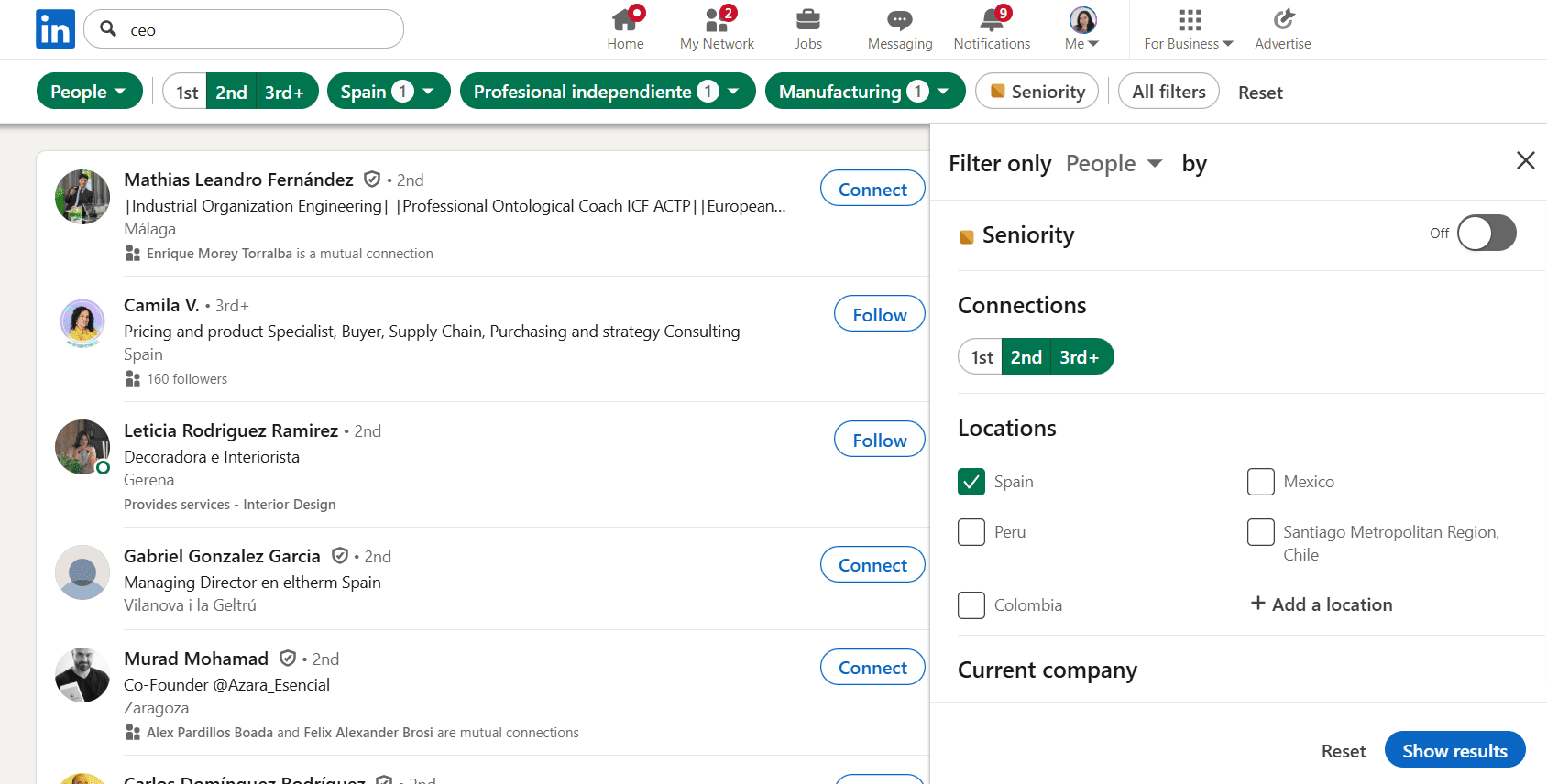
1. Go to LinkedIn and search for a keyword (for example: CEO).

2. Adjust the filters until you define your ideal lead profile.

3. Copy the URL of the search results page.

4. Log into WaLead, create a campaign, and click Add Leads.

5. Select LinkedIn Search Bar, paste the URL, and you’re done.

Why Is WaLead the Best LinkedIn Scraper?

WaLead is not just a scraper, it’s a solution built for real LinkedIn prospecting.It helps you save time, organize your leads, and launch campaigns from a single platform, using a simple, results-driven workflow.
LinkedIn Scraper

Benefits of Using WaLead for LinkedIn Scraping

Check
Extract leads directly from LinkedIn searches
Check
Save time on manual prospect management
Check
Build your own reusable lead databases
Check
Ideal for LinkedIn outreach and B2B outbound
Check
Simple flow: search, filter, copy the link, and extract with WaLead
Dashboard mockup

What Types of Leads Can You Extract from LinkedIn?

With WaLead, you can extract B2B leads from LinkedIn, including decision-makers, strategic roles, and professional profiles, segmented by industry, company, location, education, connections, and more. It’s an ideal solution for sales teams, agencies, startups, and consultants that need qualified leads to scale their prospecting efforts.

Start Extracting LinkedIn Leads Today with WaLead

Stop managing prospects manually and start extracting LinkedIn leads intelligently. With WaLead, you get full control over your leads and a tool designed to turn contacts into real business opportunities.

Frequently Asked Questions

Do I need a LinkedIn Premium account to use WaLead?

No. You can use WaLead with a standard LinkedIn account. You only need to use LinkedIn’s search bar, apply your filters, and copy the results URL to extract leads.

What types of LinkedIn searches can I use to extract leads?

You can use any search performed through LinkedIn’s search bar, filtering by keywords, job titles, location, connection level, company, education, followers, and more.

How many leads can I extract with WaLead?

With WaLead, you can define how many leads you want to extract, from 1 up to 20,000 profiles, depending on your campaign needs.

Can I avoid duplicate leads across campaigns?

Yes. WaLead allows you to prevent duplicates across campaigns, helping you keep your database clean and avoid contacting the same lead multiple times.
Imagen 5 estrellas

Start your 14-day free trial

Don't miss the opportunity to scale your sales.