Sales Navigator Scraper to Extract lead databases | WaLead

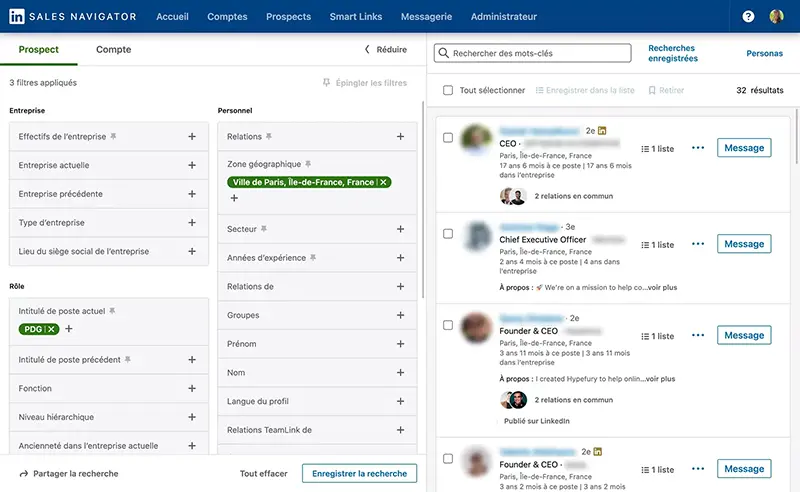
WaLead is your go-to solution for getting prospects directly from LinkedIn Sales Navigator. Take advantage of Sales Navigator’s advanced search filters: by job title, industry, location, company size, or buyer persona. Copy the results URL, and turn that data into an organized database ready for your sales and outbound prospecting campaigns.

Quickly and Easily Extract Leads from Sales Navigator with WaLead

With WaLead, pulling leads from Sales Navigator is as simple as copying and pasting the filtered results URL. Our platform handles the extraction automatically so you can start your campaigns without wasting time on manual work.

What is a SalesNav Scraper
and how does it help you?

A SalesNav Scraper automates the collection of B2B leads from LinkedIn Sales Navigator, letting you build custom databases based on segmented searches you perform. WaLead also lets you download your database to use in cold email campaigns or cold calling, all while keeping your data safe and fully under your control.

SalesNav Scraper

Accurate and Efficient B2B Lead Generatior

This tool helps you gather professional profiles and key decision-makers filtered by job title, company, region, and other relevant criteria.

Perfect for sales teams, SDRs, agencies, and consultants looking to scale their prospecting in a smart and effective way.

Scraper

Sales Navigator Limitations and Why You Need a Scraper

Sales Navigator restricts how you manage and reuse search results, making it slow and impractical to handle large volumes of leads.

It’s undoubtedly the best tool for finding LinkedIn profiles, and with WaLead, you can fully leverage it to create powerful, actionable lead databases.

WaLead removes these barriers, allowing you to integrate leads directly into your campaigns, speed up prospecting, and streamline your workflow without repetitive tasks.

How to Extract Leads from Sales LinkedIn using WaLead

When creating a campaign and adding prospects in WaLead, select Sales Navigator as your source. Paste the search URL, choose how many profiles you want to import (from 1 to 20,000), and avoid duplicates, all without any technical setup.

Step-by-Step Guide

1. Open LinkedIn Sales Navigator and perform your desired search.

2. Apply filters to narrow down your ideal customer profile.

3. Copy the URL with the results.

4. Log into WaLead, create a campaign, and click Add Leads.

5. Select Sales Navigator, paste the URL, and start importing.

Why WaLead Is the Best Choice as a SalesNav Scraper?

WaLead is not just a scraper, it’s a full platform designed to optimize your LinkedIn prospecting. Save time, centralize your leads, and launch campaigns from one simple, efficient place.
SalesNav Scraper

Benefits of Using WaLead Alongside Sales Navigator

Check
Extract leads directly from your Sales Navigator searches
Check
Cut down on manual prospect management
Check
Build reusable, scalable lead databases
Check
Perfect for outbound prospecting and B2B campaigns
Check
Keep full control over your data and prevent duplicates
Dashboard mockup

What Types of Leads Can You Get with SalesNav Scraper?

Pull qualified B2B profiles, from decision-makers to strategic professionals, segmented by industry, company, location, and more. Ideal for sales teams, agencies, startups, and consultants who need high-quality leads to grow quickly.

Start Extracting Leads from Sales Navigator with WaLead Today

Forget manual lead management and start capturing leads smartly. With WaLead, you maintain complete control of your prospects with a tool built to turn contacts into real business opportunities.

Frequently Asked Questions

What is a SalesNav Scraper and how does WaLead help me?

A SalesNav Scraper automates the collection of B2B leads from LinkedIn Sales Navigator, allowing you to build custom databases based on segmented searches. WaLead simplifies this process so you can quickly extract and organize contacts for your sales campaigns.

Do I need to install any additional software to use WaLead with Sales Navigator?

No, WaLead is a standalone platform that doesn’t require any external tools or technical setup. You just copy and paste your filtered Sales Navigator results URL to start extracting leads.

How many profiles can I import with WaLead from Sales Navigator?

You can import from 1 up to 20,000 profiles per campaign, with options to avoid duplicates and keep your database clean and organized.

Can I use the extracted data for cold email and cold calling campaigns?

Yes, WaLead lets you download the extracted database for use in cold email or cold calling campaigns, while keeping full control and security over your data.
Imagen 5 estrellas

Start your 14-day free trial

Don't miss the opportunity to scale your sales.